How to Edit a CHM File
Editing Compiled HTML Help (CHM) files can be challenging because they are essentially compressed archives of HTML pages. To modify them, you typically need to decompile the file, edit the source HTML, and recompile it. However, with CHM Editor, you can edit these files directly in a visual interface.
1. Open Your CHM File
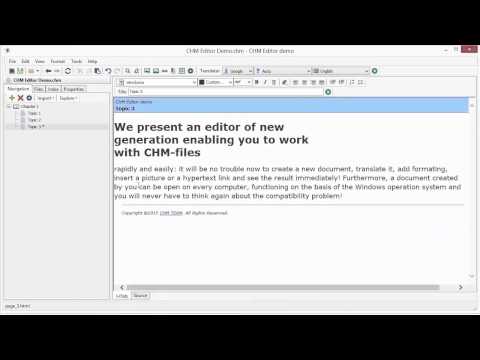
Launch CHM Editor and open the file you wish to modify. Go to File > Open or press Ctrl+O.
2. Understand the Interface
The editor window is divided into two main areas to help you manage your documentation effectively:
- Navigation Pane (Left): Displays the table of contents (Topic Tree). Click any topic to load it.
- Editor Pane (Right): The workspace where you modify content. It includes tabs for:
- HTML: The visual editor for standard editing.
- Source: For direct HTML code editing if you need fine-grained control.
3. Edit Content Visually
Once you select a topic, you can edit the text and images just like you would in a standard word processor.
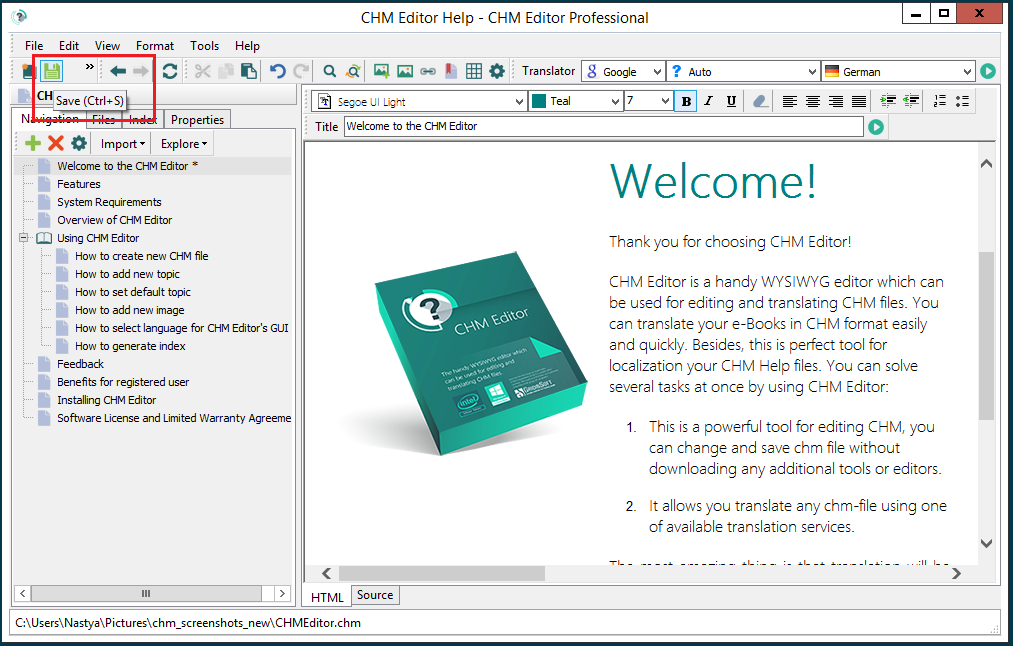
You can:
- Modify Text: Fix typos, update information, or rewrite entire sections.
- Format Content: Change fonts, colors, and styles using the toolbar.
- Manage Images: Insert new images or replace outdated ones.
4. Manage the Index
A good index helps users find information quickly. CHM Editor includes a tool to generate one automatically:
- Go to Tools > Generate Index.
- Select the topics you want to include as keywords.
- Click Generate.
You can refine this later using the Index tab to manually add or edit keywords.
5. Save Your Changes
After making your edits, save the file by clicking the Save button or pressing Ctrl+S. CHM Editor handles the recompilation process in the background, ensuring your changes are applied immediately.